> For the complete documentation index, see [llms.txt](https://docs.vega365.com/llms.txt). Markdown versions of documentation pages are available by appending `.md` to page URLs; this page is available as [Markdown](https://docs.vega365.com/redundancy-management-framework/user-manual/configuration-dashboard/enable-the-smartsync-service/smart-sync-service-service-tray/clear-log.md).

# Clear Log

Deletes the log details.

This option deletes the log files.

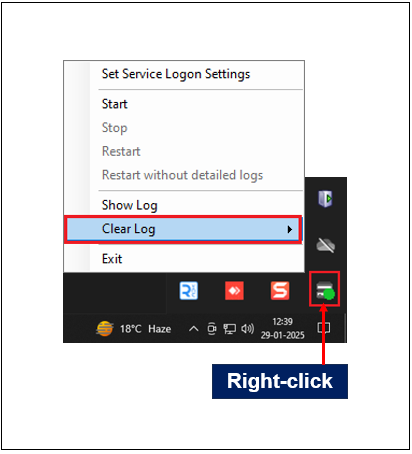
1. Select **Clear Log** from the SmartSync Service settings.

<figure><img src="https://content.gitbook.com/content/K95oxUATgzuZZ2VhRoDw/blobs/Mn2lG2XeEcz4TsXH0JNk/Clearlog.png" alt=""><figcaption><p>Clear Log Option</p></figcaption></figure>

2. Click the **Clear Log** **drop-down** to view the following options:
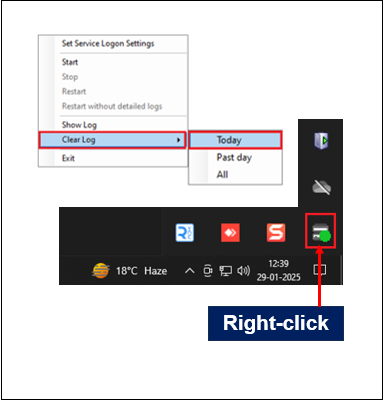
   1. **Today**—Deletes log for the current day.

<figure><img src="https://content.gitbook.com/content/K95oxUATgzuZZ2VhRoDw/blobs/pA9JrzPgpXMgJ9BSwTx1/today.png" alt=""><figcaption><p>Clear Log—Today</p></figcaption></figure>

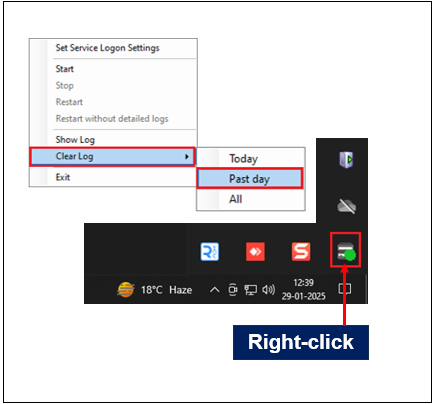
&#x20;       b. **Past day**—Deletes log from the previous day.
<figure><img src="https://content.gitbook.com/content/K95oxUATgzuZZ2VhRoDw/blobs/vbDo4PJ5oTd5lT63eXfb/Past%20day.png" alt=""><figcaption><p>Clear Log—Past day</p></figcaption></figure>

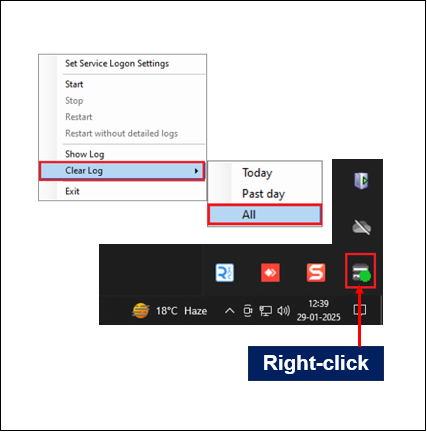
&#x20;        c. **All**—Deletes the entire log history.

<figure><img src="https://content.gitbook.com/content/K95oxUATgzuZZ2VhRoDw/blobs/tmoHkqvUp55XNYyEwCjo/ClearAll.png" alt=""><figcaption><p>Clear Log—All</p></figcaption></figure>