> For the complete documentation index, see [llms.txt](https://docs.vega365.com/llms.txt). Markdown versions of documentation pages are available by appending `.md` to page URLs; this page is available as [Markdown](https://docs.vega365.com/redundancy-management-framework/user-manual/configuration-dashboard/map-cameras.md).
# Map Cameras
Freely associate devices in primary recorders with secondary recorders in any user defined manner
## Introduction
This block appears when **Mode Selection** ([Mode Selection](https://docs.vega365.com/redundancy-management-framework/user-manual/configuration-dashboard/mode-selection.md)) **is set to Manual (Map Cameras)** and allows you to decide, one device at a time, where each camera stream will be protected. Instead of pairing whole recorders, you drag and drop (or multi-select) cameras from the **Primary Cameras** list into one or more **Secondary Recorders**.
## Prerequisite
Complete [Mode Selection](https://docs.vega365.com/redundancy-management-framework/user-manual/configuration-dashboard/mode-selection.md)- selected to the Manual mode.
## Guide
{% stepper %}
{% step %}
### Click on the Map Cameras Block
{% endstep %}
{% step %}
### Login
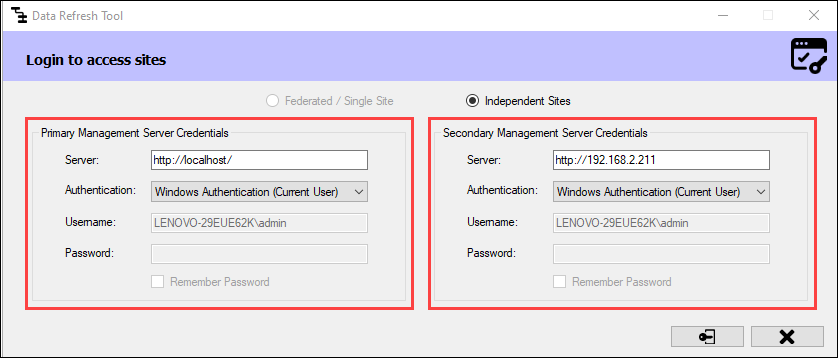
1. If in [Federated](https://docs.vega365.com/redundancy-management-framework/user-manual/architecture-options/federated.md) or [Single Site](https://docs.vega365.com/redundancy-management-framework/user-manual/architecture-options/single-site.md)architecture, log in to the parent/or single site\
2. Else, in the [Independent](https://docs.vega365.com/redundancy-management-framework/user-manual/architecture-options/independent.md) site architecture, log in to both the primary and secondary sites.
Login Screen—Independent
{% endstep %}
{% step %}
### Review the Device Tree
The following device tree appears, listing cameras in the primary recorders that are not present on any secondary recorder.
{% endstep %}
{% step %}
### Drag and Drop
Select one or more cameras on the primary server and drag them to any secondary recorder. This instructs the RMF software to establish a camera level association between the primary and secondary copies of the camera.
{% endstep %}
{% step %}
### Finish
Clicking the checkmark button commits the changes.
{% endstep %}
{% endstepper %}
The workflow provides complete flexibility to distribute primary cameras on secondary servers in any manner.