> For the complete documentation index, see [llms.txt](https://docs.vega365.com/llms.txt). Markdown versions of documentation pages are available by appending `.md` to page URLs; this page is available as [Markdown](https://docs.vega365.com/redundancy-management-framework/user-manual/what-to-install-where/federated/non-clustered-mode.md).

# Non-Clustered Mode

Follow this section if your Federated Parent Milestone Management Server is not Clustered and does not have Management Server Failover.

## For **deployments with less than 500 cameras**

For a Federated architecture and non-clustered mode with less than 500 cameras, deploy the following components:

{% hint style="info" %}
**Note:** All components are installed only on the Parent site.
{% endhint %}

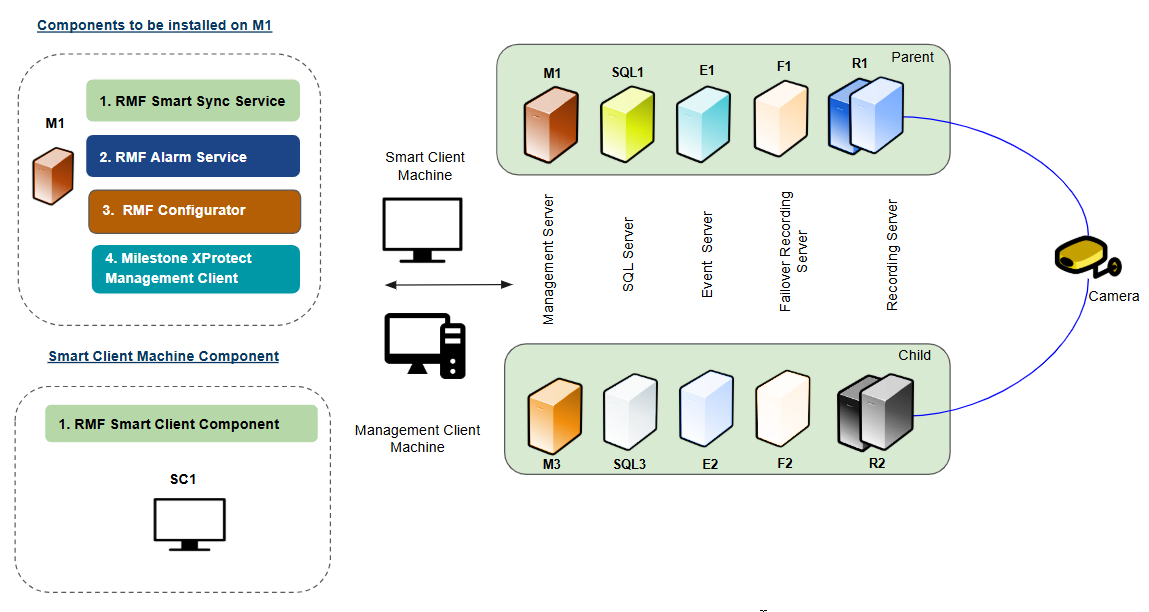
<figure><img src="https://content.gitbook.com/content/K95oxUATgzuZZ2VhRoDw/blobs/AvcgTHIiPmS5Wrdmwkx3/Federated_Non_Less.png" alt=""><figcaption><p>Federated Non-clustered Mode (Less than 500 cameras)</p></figcaption></figure>

**RMF Service Components**

The following Service components are installed on the Management Server **M1:**

* RMF SmartSync Service
* RMF Alarm Service
* RMF Configurator
* Milestone Management Client

For more information on the RMF Services Installation, go to the following sections:

<table><thead><tr><th width="353">Installation Procedure</th><th>Reference Link</th></tr></thead><tbody><tr><td>RMF Services (Manual Installation)</td><td><a data-mention href="https://docs.vega365.com/redundancy-management-framework/user-manual/installation/manual-installation/rmf-services-manual.md">RMF Services (Manual)</a></td></tr><tr><td>RMF Services (Silent Installation)</td><td><a data-mention href="https://docs.vega365.com/redundancy-management-framework/user-manual/installation/silent-installation/rmf-services-silent.md">RMF Services (Silent)</a></td></tr><tr><td>Post-Installation Procedure (RMF Services)</td><td><a data-mention href="https://docs.vega365.com/redundancy-management-framework/user-manual/installation/post-installation/validate-the-installation-of-rmf-services-and-ui.md">Validate the Installation of RMF Services and UI</a></td></tr></tbody></table>

For additional information on the Milestone XProtect Management Client, refer to the *Milestone XProtect documentation*.

**RMF Smart Client Component**

The RMF Smart Client Component is installed on the **Smart Client Machine (SC1).**

For more information on the RMF Smart Client installation, refer to the following sections:

| Installation Procedure                         | Reference Link                                                                                                                                                                                                              |
| ---------------------------------------------- | --------------------------------------------------------------------------------------------------------------------------------------------------------------------------------------------------------------------------- |
| RMF Smart Client (Manual Installation)         | [RMF Client (Manual)](https://docs.vega365.com/redundancy-management-framework/user-manual/installation/manual-installation/rmf-client-manual.md)                                                                           |
| RMF Smart Client (Silent Installation)         | [RMF Client (Silent)](https://docs.vega365.com/redundancy-management-framework/user-manual/installation/silent-installation/rmf-client-silent.md)                                                                           |
| Post-Installation Procedure (RMF Smart Client) | [Validate the Installation of RMF Smart Client Components](https://docs.vega365.com/redundancy-management-framework/user-manual/installation/post-installation/validate-the-installation-of-rmf-smart-client-components.md) |

## For **deployments with more than 500 cameras**

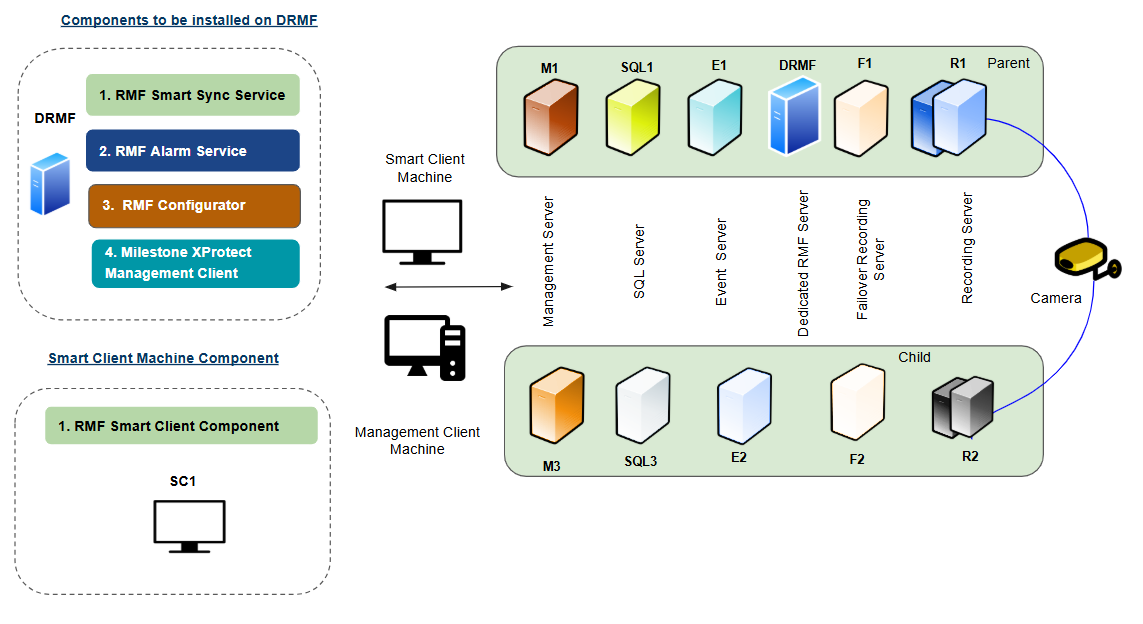
For a Federated architecture and non-clustered mode with more than 500 cameras, the RMF services components must be deployed on a dedicated RMF server (DRMF). This server must have the exact machine specifications as the Milestone Management Server and can be clustered to ensure high availability.

{% hint style="info" %}
**Note:** All components are installed only on the Parent site.
{% endhint %}

<figure><img src="https://content.gitbook.com/content/K95oxUATgzuZZ2VhRoDw/blobs/8G2NRyGe6IEY2H0DUMph/Federated_Non_More.png" alt=""><figcaption><p>Federated Non-clustered Mode (More than 500 cameras)</p></figcaption></figure>

**RMF Service Components**

The following Service components are installed on the **Dedicated RMF Server (DRMF):**

* RMF SmartSync Service
* RMF Alarm Service
* RMF Configurator
* Milestone Management Client

For more information on the RMF Services installation, refer to the following sections:

<table><thead><tr><th width="353">Installation Procedure</th><th>Reference Link</th></tr></thead><tbody><tr><td>RMF Services (Manual Installation)</td><td><a data-mention href="https://docs.vega365.com/redundancy-management-framework/user-manual/installation/manual-installation/rmf-services-manual.md">RMF Services (Manual)</a></td></tr><tr><td>RMF Services (Silent Installation)</td><td><a data-mention href="https://docs.vega365.com/redundancy-management-framework/user-manual/installation/silent-installation/rmf-services-silent.md">RMF Services (Silent)</a></td></tr><tr><td>Post Installation Procedure (RMF Services)</td><td><a data-mention href="https://docs.vega365.com/redundancy-management-framework/user-manual/installation/post-installation/validate-the-installation-of-rmf-services-and-ui.md">Validate the Installation of RMF Services and UI</a></td></tr></tbody></table>

For additional information on the Milestone XProtect Management Client, refer to the *Milestone XProtect documentation*.

**RMF Smart Client Component**

The RMF Smart Client Component is installed on the **Smart Client Machine (SC1).**

For more information on the RMF Smart Client installation, refer to the following sections:

| Installation Procedure                         | Reference Link                                                                                                                                                                                                              |
| ---------------------------------------------- | --------------------------------------------------------------------------------------------------------------------------------------------------------------------------------------------------------------------------- |
| RMF Smart Client (Manual Installation)         | [RMF Client (Manual)](https://docs.vega365.com/redundancy-management-framework/user-manual/installation/manual-installation/rmf-client-manual.md)                                                                           |
| RMF Smart Client (Silent Installation)         | [RMF Client (Silent)](https://docs.vega365.com/redundancy-management-framework/user-manual/installation/silent-installation/rmf-client-silent.md)                                                                           |
| Post Installation Procedure (RMF Smart Client) | [Validate the Installation of RMF Smart Client Components](https://docs.vega365.com/redundancy-management-framework/user-manual/installation/post-installation/validate-the-installation-of-rmf-smart-client-components.md) |