> For the complete documentation index, see [llms.txt](https://docs.vega365.com/llms.txt). Markdown versions of documentation pages are available by appending `.md` to page URLs; this page is available as [Markdown](https://docs.vega365.com/redundancy-management-framework/user-manual/what-to-install-where/single-site/clustered-mode.md).

# Clustered Mode

Follow this section if your Single Site Milestone Management Server is Clustered or has Management Server Failover.

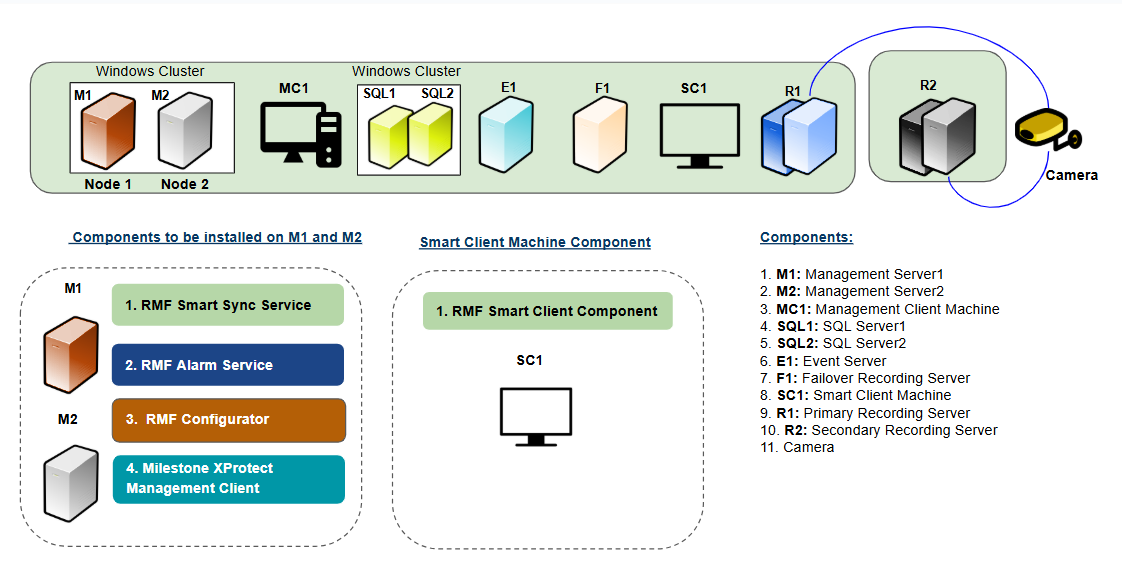
## For **deployments with fewer than 500 cameras**

For a single-site architecture and clustered mode with fewer than 500 cameras, deploy the following components:

<figure><img src="https://content.gitbook.com/content/K95oxUATgzuZZ2VhRoDw/blobs/mu1Euo3o1ecYBltYTLzx/SingleSite_Clustered_Less.png" alt=""><figcaption><p>Single Site Clustered Mode (Less than 500 cameras)</p></figcaption></figure>

**RMF Service Components**

The following Service components are installed on the Management Servers **M1 and M2:**

* RMF SmartSync Service
* RMF Alarm Service
* RMF Configurator
* Milestone Management Client

For more information on the RMF Services installation, refer to the following sections:

<table><thead><tr><th width="353">Installation Procedure</th><th>Reference Link</th></tr></thead><tbody><tr><td>RMF Services (Manual Installation)</td><td><a data-mention href="https://docs.vega365.com/redundancy-management-framework/user-manual/installation/manual-installation/rmf-services-manual.md">RMF Services (Manual)</a></td></tr><tr><td>RMF Services (Silent Installation)</td><td><a data-mention href="https://docs.vega365.com/redundancy-management-framework/user-manual/installation/silent-installation/rmf-services-silent.md">RMF Services (Silent)</a></td></tr><tr><td>Post Installation Procedure (RMF Services)</td><td><a data-mention href="https://docs.vega365.com/redundancy-management-framework/user-manual/installation/post-installation/validate-the-installation-of-rmf-services-and-ui.md">Validate the Installation of RMF Services and UI</a></td></tr></tbody></table>

**Add RMF Service Components to cluster management**

Additionally, add the Smart Sync Service and the Alarm Service to the Cluster Manager. Including these services in the cluster ensures that the standby node activates them when it becomes active, and RMF services have HA. The information below illustrates the process for the RMF alarm service when using Windows Clustering. Repeat the steps for RMF Smart Sync Service. If using Milestone Management Server Failover, the steps may vary slightly, but the outcome should be the same.

{% stepper %}
{% step %}

### Start

<figure><img src="https://73860689-files.gitbook.io/~/files/v0/b/gitbook-x-prod.appspot.com/o/spaces%2FK95oxUATgzuZZ2VhRoDw%2Fuploads%2Fq3ngh2BqPjRvPnumvEEa%2Fimage.png?alt=media&amp;token=6c99636c-0363-41bb-9597-dfe49d4113c5" alt=""><figcaption></figcaption></figure>
{% endstep %}

{% step %}

### Select

<figure><img src="https://73860689-files.gitbook.io/~/files/v0/b/gitbook-x-prod.appspot.com/o/spaces%2FK95oxUATgzuZZ2VhRoDw%2Fuploads%2F6cSkDtUSAEjaE1I1FQR5%2Fimage.png?alt=media&amp;token=393e3a02-0c90-4877-84b0-045e14e3f196" alt=""><figcaption></figcaption></figure>
{% endstep %}

{% step %}

### Confirm

<figure><img src="https://73860689-files.gitbook.io/~/files/v0/b/gitbook-x-prod.appspot.com/o/spaces%2FK95oxUATgzuZZ2VhRoDw%2Fuploads%2FR9yET6AK76qN94Cy3iKg%2Fimage.png?alt=media&amp;token=61dd24eb-6b2a-4dd0-9f62-6214f4578d9c" alt=""><figcaption></figcaption></figure>
{% endstep %}

{% step %}

### Finish

<figure><img src="https://73860689-files.gitbook.io/~/files/v0/b/gitbook-x-prod.appspot.com/o/spaces%2FK95oxUATgzuZZ2VhRoDw%2Fuploads%2Fb9shggdF2Jsc0Uj8EkTe%2Fimage.png?alt=media&amp;token=dac7a90f-8f3c-4b7f-89ce-9d0c8c19918a" alt=""><figcaption></figcaption></figure>
{% endstep %}

{% step %}

### Verify

<figure><img src="https://73860689-files.gitbook.io/~/files/v0/b/gitbook-x-prod.appspot.com/o/spaces%2FK95oxUATgzuZZ2VhRoDw%2Fuploads%2FJ3KcD4KXtWyHIxg0M5VE%2Fimage.png?alt=media&amp;token=a2bec03d-e610-4b34-aaff-789e15d136e9" alt=""><figcaption></figcaption></figure>
{% endstep %}
{% endstepper %}

For additional information on the Milestone XProtect Management Client, refer to the *Milestone XProtect documentation*.

**RMF Smart Client Component**

The RMF Smart Client Component is installed on the **Smart Client Machine (SC1).**

For more information on the RMF Smart Client installation, refer to the following sections:

| Installation Procedure                         | Reference Link                                                                                                                                                                                                              |
| ---------------------------------------------- | --------------------------------------------------------------------------------------------------------------------------------------------------------------------------------------------------------------------------- |
| RMF Client (Manual Installation)               | [RMF Client (Manual)](https://docs.vega365.com/redundancy-management-framework/user-manual/installation/manual-installation/rmf-client-manual.md)                                                                           |
| RMF Client (Silent Installation)               | [RMF Client (Silent)](https://docs.vega365.com/redundancy-management-framework/user-manual/installation/silent-installation/rmf-client-silent.md)                                                                           |
| Post Installation Procedure (RMF Smart Client) | [Validate the Installation of RMF Smart Client Components](https://docs.vega365.com/redundancy-management-framework/user-manual/installation/post-installation/validate-the-installation-of-rmf-smart-client-components.md) |

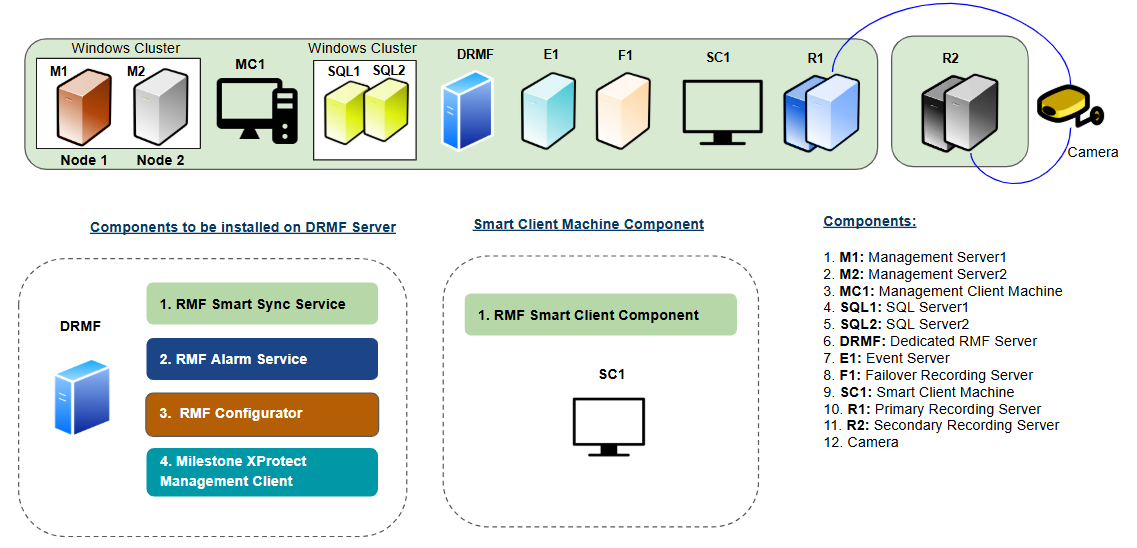
## For **deployments with more than 500 cameras**

For a single-site architecture and clustered mode with more than 500 cameras, one must deploy the RMF services components on a Dedicated RMF Server (DRMF). This server must have the exact machine specifications as the Milestone Management Server. For high availability, the DRMF server can be clustered.

<figure><img src="https://content.gitbook.com/content/K95oxUATgzuZZ2VhRoDw/blobs/a2hVH0WopDZtfaMLO0k6/SingleSite_Clustered_More.png" alt=""><figcaption><p>Single Site Clustered Mode (More than 500 cameras)</p></figcaption></figure>

**RMF Service Components**

The following Service components are installed on the **Dedicated RMF Server (DRMF):**

* RMF SmartSync Service
* RMF Alarm Service
* RMF Configurator
* Milestone Management Client

For more information on the installation procedures of these components, refer to the following sections:

<table><thead><tr><th width="353">Installation Procedure</th><th>Reference Link</th></tr></thead><tbody><tr><td>RMF Services (Manual Installation)</td><td><a data-mention href="https://docs.vega365.com/redundancy-management-framework/user-manual/installation/manual-installation/rmf-services-manual.md">RMF Services (Manual)</a></td></tr><tr><td>RMF Services (Silent Installation)</td><td><a data-mention href="https://docs.vega365.com/redundancy-management-framework/user-manual/installation/silent-installation/rmf-services-silent.md">RMF Services (Silent)</a></td></tr><tr><td>Post Installation Procedure (RMF Services)</td><td><a data-mention href="https://docs.vega365.com/redundancy-management-framework/user-manual/installation/post-installation/validate-the-installation-of-rmf-services-and-ui.md">Validate the Installation of RMF Services and UI</a></td></tr></tbody></table>

For additional information on the Milestone XProtect Management Client, refer to the *Milestone XProtect documentation*.

**RMF Smart Client Component**

The RMF Smart Client Component is installed on the **Smart Client Machine (SC1).**

<table><thead><tr><th width="337">Installation Procedure</th><th>Reference Link</th></tr></thead><tbody><tr><td>RMF Smart Client (Manual Installation)</td><td><a data-mention href="https://docs.vega365.com/redundancy-management-framework/user-manual/installation/manual-installation/rmf-client-manual.md">RMF Client (Manual)</a></td></tr><tr><td>RMF Smart Client (Silent Installation)</td><td><a data-mention href="https://docs.vega365.com/redundancy-management-framework/user-manual/installation/silent-installation/rmf-client-silent.md">RMF Client (Silent)</a></td></tr><tr><td>Post Installation Procedure (RMF Smart Client)</td><td><a data-mention href="https://docs.vega365.com/redundancy-management-framework/user-manual/installation/post-installation/validate-the-installation-of-rmf-smart-client-components.md">Validate the Installation of RMF Smart Client Components</a></td></tr></tbody></table>